Browse markets by topic
On this page
Every market on Predictions is filed under one of twelve topics, and most topics have narrower subtopics. A topic page lists all of its markets, with the day's biggest moves, what is decided soon and the news on the subject beside them.
#The twelve topics
| Topic | What it covers |
|---|---|
| Politics | The White House, Congress, the courts, policy and laws, states and cities, world leaders |
| Elections | The Senate, the House, governors, the president, primaries, state and local races and elections around the world |
| Economy | The Fed, inflation, jobs, growth and recession, rates and bonds, trade and tariffs, central banks, housing |
| Finance | Indexes, stocks, companies, earnings, IPOs and deals, commodities, currencies |
| Crypto | Bitcoin, Ethereum, Solana, XRP, other coins, crypto policy and companies |
| Sports | The NFL, college football, the NBA, college basketball, the WNBA, MLB, the NHL, soccer, golf, tennis, F1 and racing, UFC and boxing, esports, the Olympics, cricket and more |
| Culture | Awards, movies and box office, music, TV and streaming, celebrities, video games, internet and creators |
| Tech (shown as Tech & Science on the overview) | AI, space, big tech, science |
| World | Russia and Ukraine, the Middle East, China and Taiwan, Europe, the Americas, Asia and the Pacific, Africa |
| Weather (shown as Weather & Climate) | Daily weather, hurricanes and storms, climate, earthquakes and disasters |
| Health | Outbreaks, FDA decisions and drugs, public health |
| Mentions | What a politician, company or broadcaster will say: speeches, posts, earnings calls and TV |
On the overview, a row of tiles shows each topic with how many markets are open and how much money traded on them today.

The topic tiles on the overview. Each shows its open markets and the money traded on them in the last day.
- 1A topic: select it to see its markets
- 2Money traded on it in the last day
#Open a topic
- Select a topic in the row of chips under the Predictions pages, or a tile on the overview.
- Read the header. It says how many markets are open in the topic and how much money traded today.
- Narrow the list, search it or reorder it with the controls below the header.
- Select a market's question to open its page. See Read a market's page.
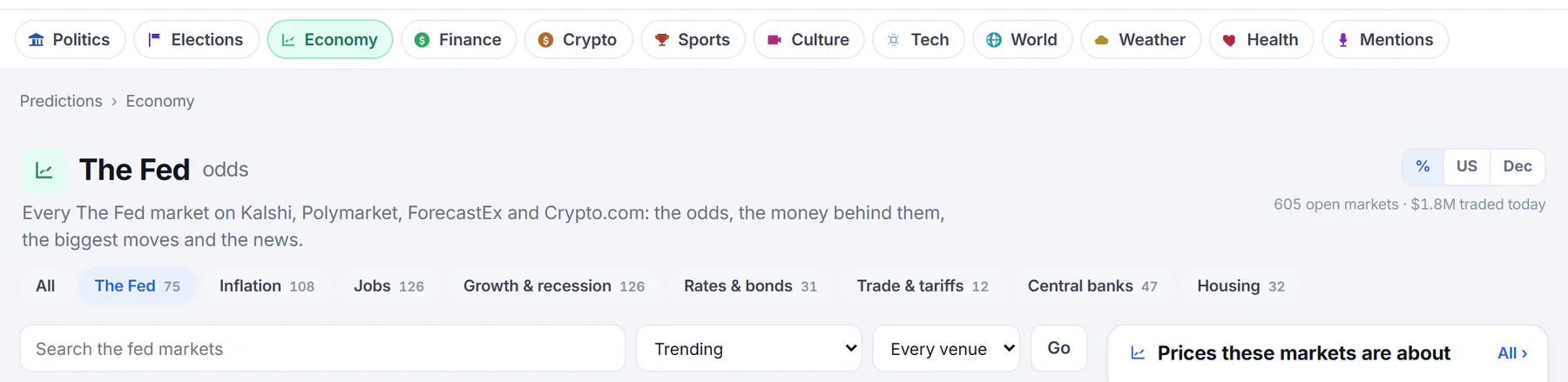
The Fed under Economy. The same controls appear on every topic and subtopic page.
- 1The topic you are in
- 2How many markets are open, and today's money
- 3Subtopics, each with its market count
- 4Search inside the topic
- 5Order the list
- 6Show one venue
#Narrow, search and order the list
- Subtopics are the chips under the header: All, then each subtopic with the number of markets in it. Only subtopics that have markets are listed.
- Search finds markets inside the topic. Type a few words, then select Go or press Enter.
- The order menu changes the sort: Trending (the default), Most money today, Most money this week, Most money ever, Closing soonest, Newest, Biggest moves today and Closest calls.
- The venue menu shows Every venue or only one of Kalshi, Polymarket, ForecastEx or Crypto.com.
- More › and ‹ Previous at the bottom page through the list, 24 markets at a time.
Choosing from the order menu or the venue menu applies it at once. The search needs Go or Enter.
#What else a topic page shows
Beside the list, a topic page has short boxes that link to the fuller pages for the topic:
- Biggest moves today, with More for the movers page filtered to the topic.
- Decided soon, with a link to the calendar.
- In the news: the markets whose subjects are named in the headlines.
- Prices these markets are about, on Economy, Finance and Crypto: stocks, rates and coins with their latest prices. See Stocks, rates and coins that markets are about.
- The topic's news, from the 4Search news index, with a link to more. See The news behind the odds.
A few topics have something of their own:
- Economy › The Fed opens with The Fed's next meetings: the chance of a cut, a hold or a hike at each meeting, with the interest-rate range those odds imply. A note under the box says how it combines the venues.
- Sports shows Upcoming games as scoreboards and Championships and awards below it. A subtopic such as NFL shows its own games and futures.
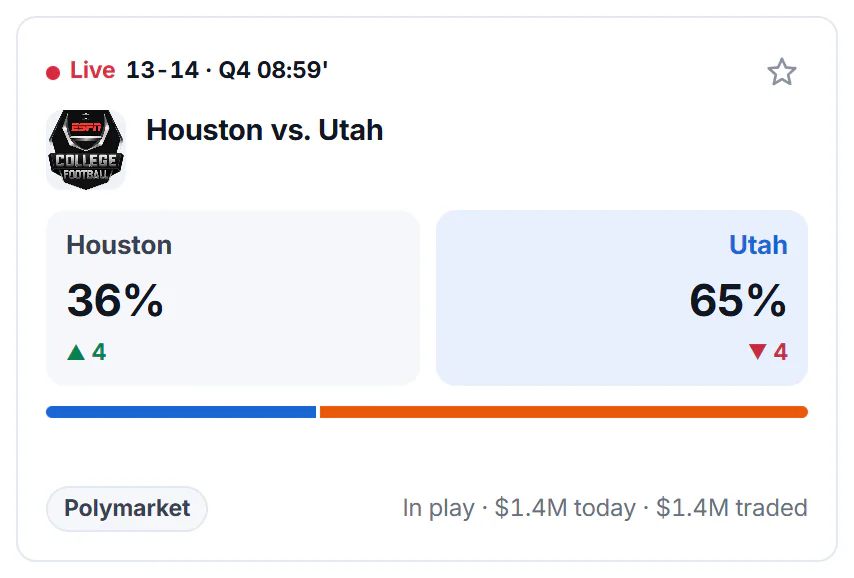
A game as a scoreboard: each side's chance, the draw in the middle where there is one, and a bar showing the split. A red Live tag shows the score while it is in play.
- 1Live, with the score and the period
- 2Each side's chance
- 3The side traders favor
- 4The split as a bar
- 5Venues, when it starts and the money
A game's card names each side and shows its chance and how far it moved today. The side traders favor is highlighted. Only who wins is shown: spreads, totals and player props are left out. Before a game it says when it Starts, during it In play and Live with the score and period when the venue provides them, and afterward Final.
#Common questions
Why is a market filed under a topic I did not expect?
Markets are filed by the venue's own categories and by their titles, and some questions fit more than one topic. If you cannot find a market in a topic, search for it. See Search prediction markets.
What are Mentions markets?
Questions about what someone will say, such as whether a speaker will use a certain word in a rally or an earnings call. Each outcome is a word or phrase, sometimes with a count such as 3+ times, and its chance is that it is said.
Why does a topic show fewer markets than I expected?
Each venue chooses what to list, and Predictions leaves out some kinds of market, such as the side bets on a game (spreads, totals and player props). The count beside a subtopic is the markets that are open now.
Can I see only one venue?
Yes. Use the venue menu on a topic page. It changes only that list.