How to reach us
On this page
You reach 4Search through a form on the site. Which form depends on what you need, and a few details in your message make it much easier to help. This page covers both.
#Choose the right route
| You want to | Go to |
|---|---|
| Report a problem, ask a question or give feedback | The Contact page, topic General inquiry. It is in the Menu as Contact and in the footer as Contact us. |
| Ask about advertising or a campaign | The Advertise page, which is the same form with Advertising already selected |
| Report an accessibility barrier or ask for another format | The Contact page, with Accessibility already selected. The Accessibility page links to it |
| Ask a copyright question | The Contact page, topic Copyright / DMCA. For a formal notice, follow the steps on the Copyright & DMCA page |
| Ask about licensing 4Search data for a product | The Contact page, with Data licensing selected, and read the Data Licensing policy first |
| Report a wrong, unsafe or misleading AI answer | The Contact page. Include the question, the date and a description of what you saw |
| Report a security problem | The Contact page, beginning your message with SECURITY REPORT. See the Security page |
| Ask to see, correct or delete your information, or to opt out | The Privacy Request Form, not the contact form. See Make a privacy request |
The policy pages also list a postal address and a telephone number.
#Send a message
-
Open the Contact page. Under What can we help with?, select every topic that fits. One is selected for you.
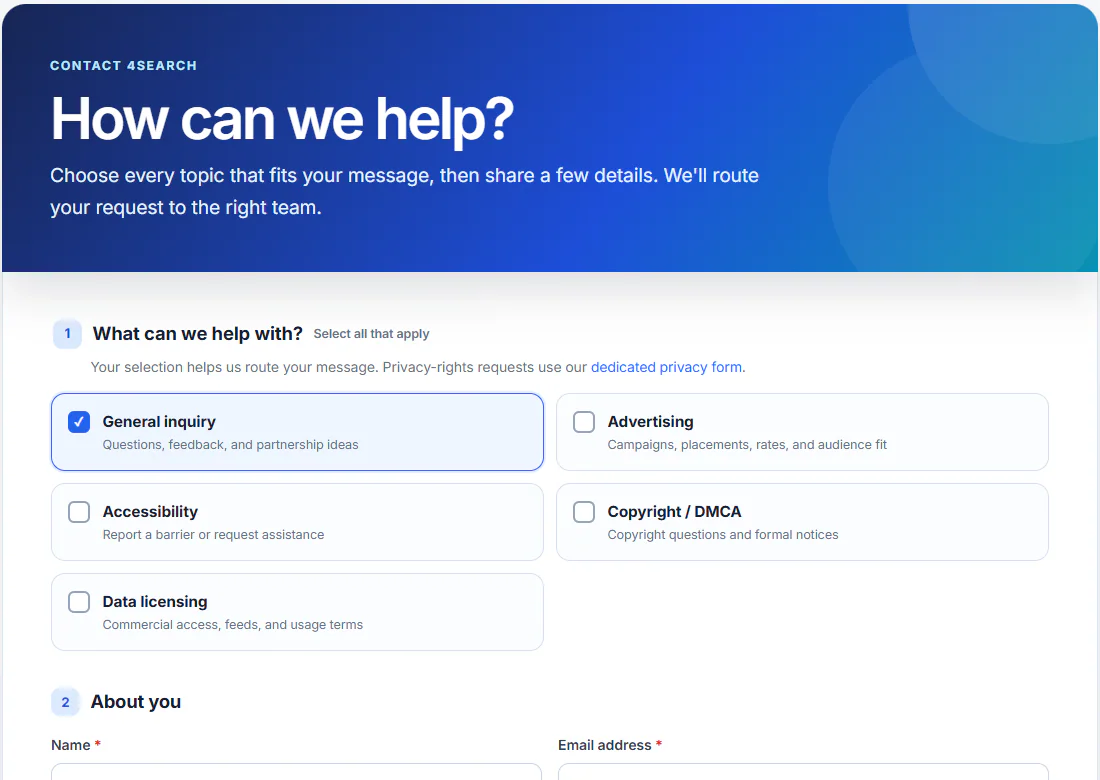
Choose every topic that fits, then add your name and email address.
- 1Choose every topic that fits
- 2Name and email address are required
- 3We use it to reply
-
Under About you, enter your Name and Email address. These are required. Company, Title, Website and Phone are optional.
-
Under Your message, describe the problem or question. See the next section for what to include.
-
Under Quick security check, type the characters shown in the image. If you cannot read them, select Show another code.
-
Select Send message.
When it is sent, the page says Your submission has been received. and shows a Reference code made of three groups of characters, such as K7QM-3XHP-9RWD. Keep it, and quote it if you write to us again about the same message. If no reference appears, the message was still received.
#What to include
The more specific you are, the faster we can help.
- The page. Copy its address from the address bar.
- What you did, step by step, what you expected and what happened instead.
- The words on the screen, exactly, if there was a message.
- When it happened, with your time zone.
- Your browser and device, for example Chrome on Android.
- What a screenshot would show, described in words. The form cannot take attachments.
- For a search problem: the search, the tab and any filters.
- For an AI answer: the question you asked and the date.
- For wrong data: which value, which page and what you believe is correct.
Do not send passwords, payment-card details, government identification numbers, medical records or other sensitive information you do not need to share. The form asks you not to.
#If the form will not send
| The page says | What to do |
|---|---|
| Please correct the highlighted fields and try again. | Fill in the name, a valid email address and the message, and choose at least one topic. |
| The security code is incorrect. | Select Show another code and type the new one. |
| Your form session has expired. Reload the page and try again. | Reload the page and send again. |
| Too many submissions. Please wait before trying again. | You sent several in a short time. Wait a few minutes. |
| The request timed out. Please check your connection and try again. | Check your connection and try again. |
| We could not process your submission. Please try again later. | Try again later. |
#What happens next
The form says your request will be routed to the right team. For a privacy request, the policy says the site responds within the period the law requires, ordinarily 45 days. We do not promise a reply time for other messages.
The form keeps your IP address, browser details, the page you came from and the security code with your message, as it says above the Send message button. See What 4Search collects, and what it does not.
#Common questions
What is the reference code for?
It identifies your message. Quote it if you follow up. It looks like K7QM-3XHP-9RWD.
Can I report several things at once?
Yes. Tick every topic that fits, or send a separate message for each issue so each gets its own reference.
Why do I have to type a security code?
It shows the message came from a person. The form calls it a quick security check.
Where do I send a privacy request?
Not here. Use the Privacy Request Form. See Make a privacy request.